Adding formatted text to Swift in Xcode

Formatting in Playgrounds and Xcode projects is achieved using Markups in comments. The following article describes some of the things that you can do. Note that there are many more ways of acheiving some of the effects shown here.

The idea behind markups is to make your code more readable whether you are using Playgrounds or Xcode.

If you can only see the commented code in playgrounds and not the rendered markup then click on Editor > Show Rendered Markup to view the rendering. You can use this option to toggle back and forth.

Formatting in Playgrounds

Plain Text

There are different kinds of text you can place in a Playground. Let us look at the code below to see what all is achieved.

//: # Documentation
//: ## Contents
//: * Text Description
//: * Documentation for Functions
//: * Documentation for Types
//: * Formatting Text
//:  - Code
//:  - Italics
//:  - Bold
//: * Inserting Items
//: * Links
//: * Assets
//: * Callouts

The comments here are in the format //:.

Rendered Output

This is how the rendered output looks.

Line 1 shows how to render a Title Text. This is achieved using the # before the text.
Line 2 shows how to get a lower sized text by using ## instead of #. We can achieve more levels if we wish.

For multi line text with bullets use the *, +, – symbols. This is seen on lines 7-13.

It is also possible to create numbered lists too. Simply type the numbered list & it renders accordingly.

//: * Inserting Items
//: 1. Links
//: 2. Assets
//: 3. Callouts

This renders as:
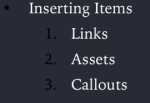
Screen Shot 2017-11-08 at 11.25.27 AM

Playground Pages

It is possible to have multiple pages in Playgrounds. This way we can create a more readable experience that makes the code structured, compartmentalised and easier to understand.

To do that open a playground and then simply add a playground by clicking File > New > Playground Page.

To move from one page to the next simply write the comment.

//: [Next Topic](@next)

This will automatically place a link to jump to the next page.

Similarly you can add a link to move to the previous page.

//: [Previous](@previous)

Code block

We can even show a code block in the text. It is formatted in a different manner to tell the user that it is a code block.

//: ### Code block
/*:
Loop to print characters
````
for char in "Arun Patwardhan"
{
    print(char)
}
*/

This is how it appears:
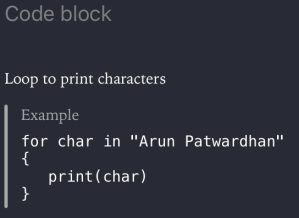
Screen Shot 2017-11-08 at 11.30.45 AM

Function Help

There is also some formatting that can be done for functions, types and other pieces of code written in a playground. This also appears on the quick help of the sidebar.

We will look at how to create formatted markup for playgrounds.

/*:
## This function takes temperature in Centigrade and converts it to Fahrenheit.
- important: This function does not do data validation
*/
/*:
- Note: "Please refer to Quick Help for more information."
*/
/*:
- Callout(Custom Callout): This is how you create a custom callout ` - Callout(Custom Callout):`
*/
/*:
- Example: `convert_to_fahrenheit_from(Centigrade: 32.0)`
*/

This renders as:
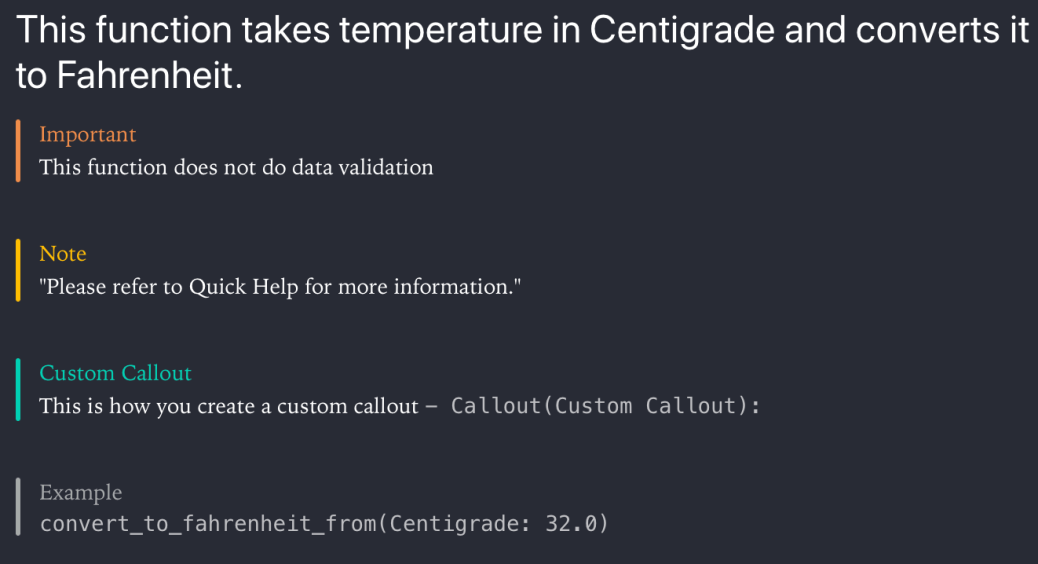
Formatted Markup for Functions

Formatted Markup for Functions.

We will look at formatting the comments to appear in Quick Help in the Formatting for Xcode section.

Inserting Links

The last bit is related to inserting links. We have already seen how to insert links for moving between Playground pages.

Redirecting to URL

/*:
For more articles on Programming, see [Programming articles @ arunpatwardhan.com](https://arunpatwardhan.com/category/programming/)
*/

This renders as:

Screen Shot 2017-11-09 at 11.14.24 AM

Formatting for Xcode

Function Help

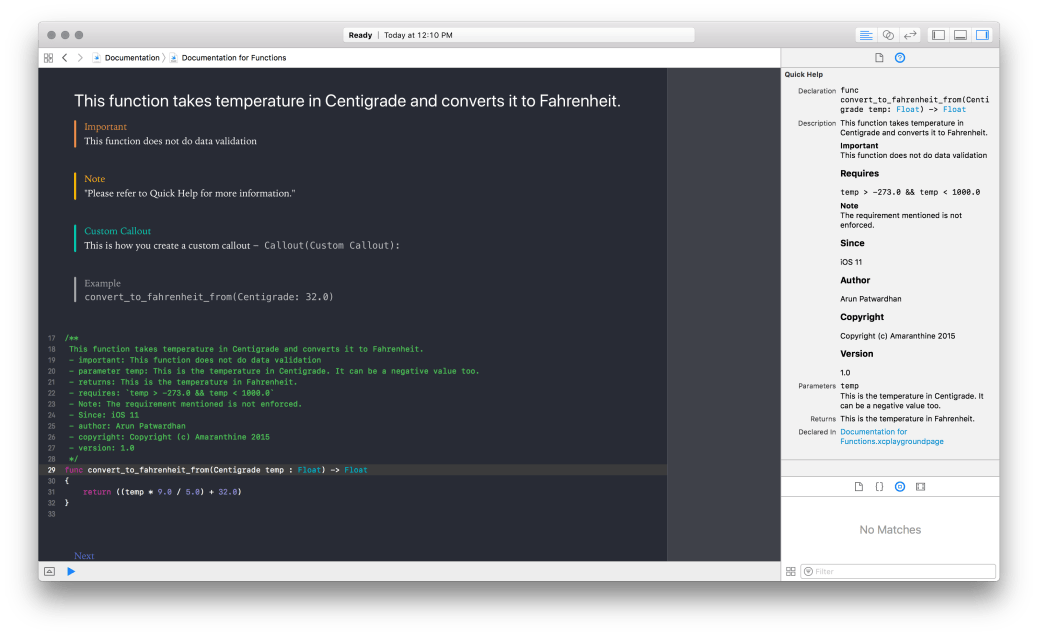
As we saw in the earlier section we can create a lot of documentation for Functions. The approach is similar to the one we used in Playgrounds. We will be using callouts to provide information. We will use some callouts for Playgrounds, however, there are many more callouts available for Xcode Symbol Documentation as compared to Playground. The main difference here is the fact that the comments begin with /** instead of /*:.

“The code shown below will work in both, regular Xcode projects as well as Playgrounds.”

/**
This function takes temperature in Centigrade and converts it to Fahrenheit.
- important: This function does not do data validation
- parameter temp: This is the temperature in Centigrade. It can be a negative value too.
- returns: This is the temperature in Fahrenheit.
- requires: `temp > -273.0 && temp < 1000.0` - Note: The requirement mentioned is not enforced. - Since: iOS 11 - author: Arun Patwardhan - copyright: Copyright (c) Amaranthine 2015 - version: 1.0 */
func convert_to_fahrenheit_from(Centigrade temp : Float) -> Float
{
    return ((temp * 9.0 / 5.0) + 32.0)
}

This renders as:
Formatted Markup for Playgrounds as well as Quick Help

Formatted Markup for Playgrounds as well as Quick Help

Note that the quick help appears in the Right hand side sidebar. That too only after you select the function.

As we can see this makes the function a lot more readable. The real advantage of Quick Help comes in the fact that the documentation is now easily accessible no matter which file we are in within the project. The also helps the developer put in the right kind of information, required for proper usage of the function, in the help section.

Note that the rendered markup for Playgrounds will only appear in Playgrounds. 

Inserting Links

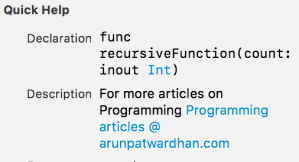
Just like in the previous section where we introduced links we can add links to the symbol documentation.

/**
   For more articles on Programming [Programming articles @ arunpatwardhan.com (https://arunpatwardhan.com/category/programming/)
*/
func recursiveFunction(count : inout Int)
{
   while 0 <= count
   {
      count -= 1
      recursiveFunction(count: &count)
   }
}

This renders in Quick Help as:
Screen Shot 2017-11-09 at 11.26.53 AM

Callouts supported by Playgrounds

  • Custom Callout
  • Example

Callouts supported by Symbol Documentation

  • Attention
  • Author
  • Authors
  • Bug
  • Complexity
  • Copyright
  • Date
  • Invariant
  • Precondition
  • Postcondition
  • Remark
  • Requires
  • See Also
  • Since
  • Version
  • Warning

Callouts supported by both Playgrounds & Symbol Documentation

  • Experiment
  • Important
  • Note

Programming Style Guide: Code Refactoring

One of the key attributes towards code that is readable and easy on the eyes is code that is split into appropriately sized pieces. Code refactoring is does exactly that. It is very easy to write a program as one big piece of code. Of course, any program that grows becomes increasingly complicated and highly inefficient. If not controlled, it will soon reach a point where it is highly unreadable, extremely difficult to maintain & filled with bugs. Not to mention that it is inefficient too.

Refactoring code and breaking it down into smaller reusable chunks is the key. The objective is:

  1. To make code easier to read
  2. To make reusable components so that we can save on duplication of code. This will reduce the code count and make sure that any changes to the reused code are available everywhere.
  3. To lend a structure to the application. Tasks now have their own space.
  4. Build scalable and maintainable code.
  5. Build bug free code.

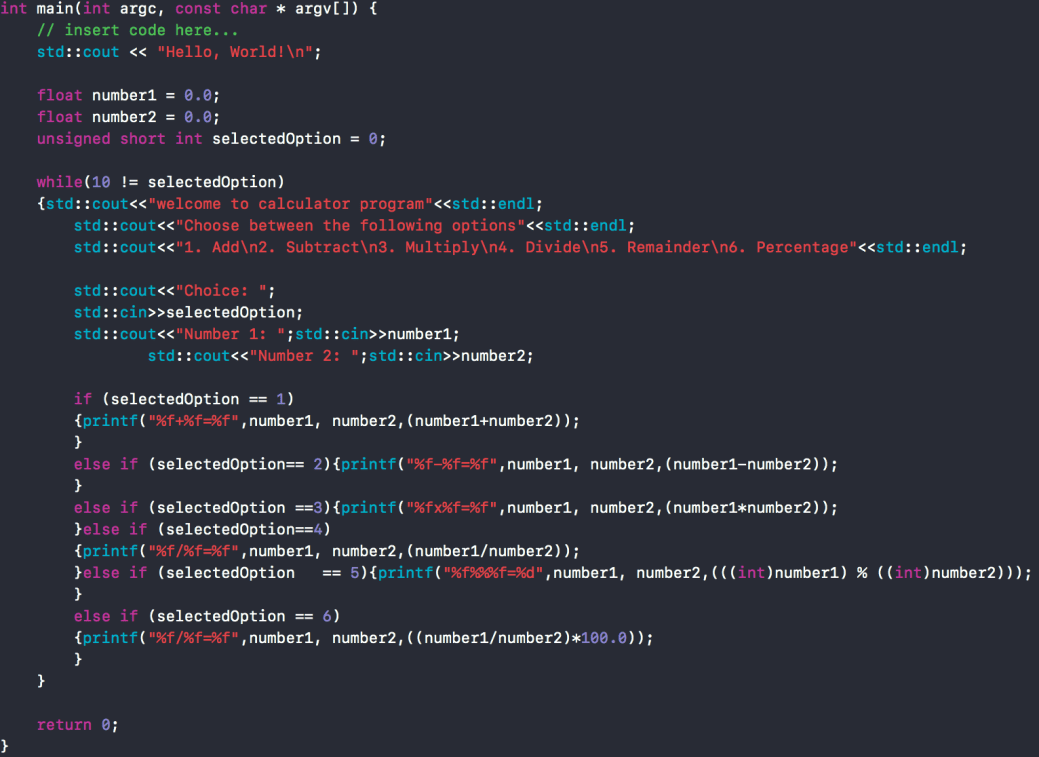
Let us look at an example.

Screen Shot 2017-10-16 at 11.26.26 AM

Bad Code

This code is clearly written poorly. Its difficult to read. There aren’t good whitespaces. No consistency. Even the naming conventions are poor.

The fix would be :

  • Break it down into different functions
  • Separate tasks into their own files
  • Name the different elements of the code properly.

This is how the code looks now. It has been broken down into different files.

main.cpp

#include <iostream>
#include "MathOperations.hpp"
#include "Choices.hpp"

int main(int argc, const char * argv[])
{
     float number1           = 0.0;
     float number2           = 0.0;
     Choices selectedOption  = CLEAR;
     float answer            = 0;
     float integralAnswer    = 0;

     while(EXIT != selectedOption)
     {
          //Welcome message
          std::cout<<"Welcome to Calculator Program"<<std::endl;
          std::cout<<"Choose between the following options"<<std::endl;
          std::cout<<"1. Add\n2. Subtract\n3. Multiply\n4. Divide\n5. Remainder\n6. Percentage"<<std::endl;

          //User choice
          std::cout<<"Choice: ";                               std::cin>>selectedOption;

          //Chance to enter first number
          std::cout<<"Number 1: ";                               std::cin>>number1;

          //Chance to enter second number
          std::cout<<"Number 2: ";                               std::cin>>number2;

          switch (selectedOption)
          {
               case ADDITION:
                    answer = addition(number1, number2);
                    std::cout<<"The addition of "<<number1<<" & "<<number2<<" = "<<answer<<std::endl;
                    break;
               case SUBTRACTION:
                    answer = subtraction(number1, number2);
                    std::cout<<"The subtraction of "<<number1<<" & "<<number2<<" = "<<answer<<std::endl;
                    break;
               case MULTIPLICATION:
                    answer = multiplication(number1, number2);
                    std::cout<<"The multiplication of "<<number1<<" & "<<number2<<" = "<<answer<<std::endl;
                    break;
               case DIVISION:
                    answer = division(number1, number2);
                    std::cout<<"The division of "<<number1<<" & "<<number2<<" = "<<answer<<std::endl;
                    break;
               case REMAINDER:
                    integralAnswer = remainder((int)number1, (int)number2);
                    std::cout<<"The remainder of "<<number1<<" divided by "<<number2<<" = "<<integralAnswer<<std::endl;
                    break;
               case PERCENTAGE:
                    answer = percentage(number1, number2);
                    std::cout<<"The percentage of "<<number1<<" out of "<<number2<<" = "<<answer<<span 				data-mce-type="bookmark" 				id="mce_SELREST_start" 				data-mce-style="overflow:hidden;line-height:0" 				style="overflow:hidden;line-height:0" 			></span><std::endl;
                    break;
               default:
                    break;
          }
     }
     return 0;
}

Choices.hpp

#ifndef Choices_hpp
#define Choices_hpp

#include <stdio.h>
#include <iostream>

enum Choices : unsigned short int { ADDITION = 1, SUBTRACTION, MULTIPLICATION, DIVISION, REMAINDER, PERCENTAGE, CLEAR, EXIT};

typedef enum Choices Choices;

std::istream& operator >>(std::istream &is, Choices& enumVar);

#endif

Choices.cpp

#include "Choices.hpp"

std::istream& operator >>(std::istream &is, Choices& enumVar)
{
    unsigned short int intVal;
    is>>intVal;
    switch (intVal) {
        case 1:
            enumVar = ADDITION;
            break;
        case 2:
            enumVar = SUBTRACTION;
            break;
        case 3:
            enumVar = MULTIPLICATION;
            break;
        case 4:
            enumVar = DIVISION;
            break;
        case 5:
            enumVar = REMAINDER;
            break;
        case 6:
            enumVar = PERCENTAGE;
            break;
        default:
            enumVar = EXIT;
            break;
    }
    return is;
}

MathOperations.hpp

#ifndef MathOperations_hpp
#define MathOperations_hpp

#include <stdio.h>

//Addition
float addition(float number1, float number2);

//Subtraction
float subtraction(float number1, float number2);

//Multiplication
float multiplication(   float number1, float number2);

//Division
float division(float number1, float number2);

//Remainder
int remainder(int number1, int number2);

//Percentage
float percentage(float number1, float number2);

#endif

MathOperations.cpp

#include "MathOperations.hpp"

//Addition
float addition(float number1, float number2)
{
    return number1 + number2;
}

//Subtraction
float subtraction(float number1, float number2)
{
    return number1 - number2;
}

//Multiplication
float multiplication(   float number1, float number2)
{
    return number2 * number1;
}

//Division
float division(float number1, float number2)
{
    if (number2 > 0) {
        return number1 / number2;
    }
    return 0.0;
}

//Remainder
int remainder(int number1, int number2)
{
    return number1 % number2;
}

//Percentage
float percentage(float number1, float number2)
{
    if (number2 > 0) {
        return (number1 / number2) * 100.0;
    }
    return 0.0;
}

Let us look at how this looks for Swift.
main.swift

import Foundation

var number1 : Float             = 0.0
var number2 : Float             = 0.0
var selectedOption : Choices    = Choices.CLEAR
var answer : Float              = 0.0
var integralAnswer : Int        = 0

func readNumbers(One firstNumber : inout Float, Two secondNumber : inout Float)
{
     //Chance to enter first number
     print("Number 1: \n")
     firstNumber = Choices.inputNumbers()

     //Chance to enter second number
     print("Number 2: \n")
     secondNumber = Choices.inputNumbers()
}

while(Choices.EXIT != selectedOption)
{
     //Welcome message
     print("Welcome to Calculator Program")
     print("Choose between the following options")
     print("1. Add\n2. Subtract\n3. Multiply\n4. Divide\n5. Remainder\n6. Percentage")

     //User choice
     print("Choice: \n")
     selectedOption = Choices.inputChoices()
     switch (selectedOption)
     {
          case Choices.ADDITION:
               readNumbers(One: &number1, Two: &number2)
               answer = addition_of(_value: number1, with_value: number2)
               print("The addition of \(number1) & \(number2) = \(answer)")
               break
          case Choices.SUBTRACTION:
               readNumbers(One: &number1, Two: &number2)
               answer = subtraction_of(_value: number1, from_value: number2)
               print("The subtraction of \(number1) & \(number2) = \(answer)")
               break
          case Choices.MULTIPLICATION:
               readNumbers(One: &number1, Two: &number2)
               answer = multiplication_of(_value: number1, with_value: number2)
               print("The multiplication of \(number1) & \(number2) = \(answer)")
               break
          case Choices.DIVISION:
               readNumbers(One: &number1, Two: &number2)
               answer = division_of(_value: number1, by_value: number2)
               print("The division of \(number1) & \(number2) = \(answer)")
               break
          case Choices.REMAINDER:
               readNumbers(One: &number1, Two: &number2)
               integralAnswer = remainder_of(_value: Int(exactly:number1)!, <span 				data-mce-type="bookmark" 				id="mce_SELREST_start" 				data-mce-style="overflow:hidden;line-height:0" 				style="overflow:hidden;line-height:0" 			></span>divided_by_value: Int(exactly: number2)!)
               print("The remainder of \(number1) divided by \(number2) = \(integralAnswer)")
               break
          case Choices.PERCENTAGE:
               readNumbers(One: &number1, Two: &number2)
               answer = percentage_of(_value: number1, with_respect_to_value: number2)
               print("The percentage of \(number1) out of \(number2) = \(answer)")
               break
          default:
               selectedOption = .EXIT
               break
     }
}

Choices.swift

import Foundation

enum Choices { case ADDITION, SUBTRACTION, MULTIPLICATION, DIVISION, REMAINDER, PERCENTAGE, CLEAR, EXIT}

//CLI Reading Capability
extension Choices
{
    static func inputChoices() -> Choices
    {
        let ip : String? = readLine()
        let choice : String = String(ip!)

        switch choice {
        case "1":
            return .ADDITION
        case "2":
            return .SUBTRACTION
        case "3":
            return .MULTIPLICATION
        case "4":
            return .DIVISION
        case "5":
            return .REMAINDER
        case "6":
            return .PERCENTAGE
        default:
            return .EXIT
        }
    }

    static func inputNumbers() -> Float
    {
        let ip : String? = readLine()

        let numberFormatter = NumberFormatter()
        let number = numberFormatter.number(from: ip!)

        let num : Float? = number?.floatValue
        return num!
    }
}

MathOperations.swift

import Foundation

//Addition
func addition_of(_value number1 : Float, with_value number2 : Float) -> Float
{
    return number1 + number2;
}

//Subtraction
func subtraction_of(_value number2 : Float, from_value number1 : Float) -> Float
{
    return number1 - number2;
}

//Multiplication
func multiplication_of(_value number1 : Float, with_value number2 : Float) -> Float
{
    return number2 * number1;
}

//Division
func division_of(_value number1 : Float, by_value number2 : Float) -> Float
{
    if (number2 > 0) {
        return number1 / number2;
    }
    return 0.0;
}

//Remainder
func remainder_of(_value number1 : Int, divided_by_value number2 : Int) -> Int
{
    return number1 % number2;
}

//Percentage
func percentage_of(_value number1 : Float, with_respect_to_value number2 : Float) -> Float
{
    if (number2 > 0) {
        return (number1 / number2) * 100.0;
    }
    return 0.0;
}

Discussion on Swift Extensions

As we can see that most of the code in Swift is very similar to C++. Most of the differences are basic syntactic differences. However, there is 1 feature of Swift that greatly aids code refactoring that I would like to talk about, Extensions.

Extensions allow us to add new functionality to the existing type. As the name says the type is extended. This allows us to add changes to a type in a consistent & clearly demarcated way. Developers can now neatly separate newly added components. This greatly helps in understanding the evolution of types.

“This is often referred to as versioning.”

Extensions can be used in the following ways to implement code refactoring:

  • Different sections of a type reside in their own extensions
  • Changes made to a type are made by keeping them in their own extensions
  • Step by step build up of code is done by representing each step as an independent extension. This gives clarity on how a certain end result was achieved.

Conclusion

As we can see from the sample code above (for both C++ & Swift) the program is much more readable. Code is carefully compartmentalised. Its a lot easier to read. It is a lot easier to scale too.

The reader may point out that the amount of code to achieve the same result is significantly higher, that however is a small price to pay in the long run. The biggest advantage is the scalability & the ease with which it can be done. Simply breaking code down into separate files & functions makes a huge difference. Here are some other benefits:

  • Individual files can be modified. This means one can now have a team working on different parts of the code.
  • Code is less cluttered. Changes are now spread across files & are easier to track.

We will now see how we can further improve this code in upcoming articles.

Programming Style Guide – The Need for programming standards

Programming Style Guide refers to the conventions followed while writing programs. This guide is going to be a series of blogs highlighting different programming standards. The series will try to cover as many standards as possible, focus will be on common and popular standards.

But why the need for programming standards? Standards help software developers design software in such a way that it is easy to read, understand, maintain & expand. It provides a consistent experience & also speeds up the way in which software development is done.

A program written with the best standards kept in mind is self explanatory, easy to read, can be built on, & is a stable piece of software

This specific article will act as a Content list for all the articles written as a part of this series. The examples are from the Swift & C++ programming languages.

  1. Naming Conventions
  2. Code Refactoring
  3. Programming Style Guide: Documentation
  4. Programming Style Guide: Command Query Separation


Programming Style Guide: Naming Conventions

Today we are going to look at Naming conventions you can follow while writing code.

Naming conventions lay down the basic rules for naming different elements in your code. The objectives are simple:

  • Make the element easy to read
  • Should be self explanatory
  • Should contain information in a compact and concise manner.

Ideally a well named variable or function should not need a comment to explain what it is for.

With the above objectives in mind let us look at some of the naming conventions that can be followed. The examples are from the Swift & C++ programming languages.

Naming Conventions

Camel Case Names

In camel case naming convention the entire name of the element is constructed by forming a sentence joined into a single word. So for example if we have a variable for keeping track of the price of oil in US dollars then the variable name might be priceOfOilUSD.

Here are some examples of naming conventions with the camel case.

SWIFT

var priceOfOil : Float = 23.49

C++

float priceOfOil = 3.45;
class PersonInfo
{

};

Underscore Separated Names

In the underscore separated naming convention the entire name of the element is constructed by forming a sentence joined together with the help of underscores in-between them. So if we take the example of the variable keeping track of the price of oil in US dollars the the variable name might be price_of_oil_usd.

Swift

var price_of_oil : Float = 45.71

C++

float price_of_oil = 99.87;

void print_value_of_pi()
{
     //print something
}

Names with type information

A naming convention that is quite popular is the one that mixes the previous 2 naming conventions, with the underscore used to separate the type description in the prefix. So if we take the example of the variable keeping track of the price of oil in US dollars then the variable name might be f_priceOfOil or float_priceOfOil. Either of the design styles work. The prefix is popularly abbreviated and you can create your own rules for abbreviating the type description.

This style is often referred to as the Hungarian notation. The additional information that is provided as a part of the prefix can be:

  • Whether the variable is a pointer
  • Whether the variable is an object
  • The scope of the variable
  • Type size
  • Whether the data can vary or is a constant

Swift

var f_priceOfOil : Float = 0.0

C++

float f_priceOfOil = 22.3;
int *ptr_memmoryBuffer = NULL; //ptr indicates variable is a pointer

Naming Rules

There are some rules that are typically followed while designing names for variables and  functions. Like the conventions themselves the rules are not binding but they are very useful an give the added punch that naming conventions provide.

  1. Variable names always start in lower case.
  2. Type names always start in upper case.
  3. The naming conventions is consistently applied through all the projects
  4. Names should be kept as small as possible without sacrificing on the description

Naming Strategies

As far as strategies are concerned there are multiple approaches that one can follow. Here are some potential strategies.

  • Follow one naming convention for variables and another convention for functions.
  • Let constants be all upper case
  • Prefix types with your companies initials.

Summary

The above illustrate just some of the naming conventions that can be followed. By no means are they comprehensive or complete. Also it is not necessarily true that everyone follows the above naming conventions. You may find that many software development firms have their own unique naming convention. This article should give you an an idea about naming conventions. Feel free to share some naming conventions that you have come across.

When to use Swift & when to use Objective-C?

Over the past few years I have received a number of questions with regards to Swift & Objective-C. Specifically related to the future of the 2. I will try to address those questions in the form of an FAQ.

Should I learn Swift or Objective-C?

This is a question that I get from developers new to iOS/macOS App Development. Ideally speaking, you should learn Swift. As that is going to become the main language for App development on Apple’s ecosystem. However, the reality is a little different. There are a large number of applications that are written in Objective-C. You are likely to encounter them at your workplace. You may also have to maintain, upgrade & improve those apps. In such a case, it makes sense to learn Objective-C too.

Can I mix Swift & Objective-C in the same project?

Yes! But remember that you should check for feature compatibility between the 2 languages. Adding Swift code to an Objective-C project may not be very beneficial as only those features that are compatible with Objective-C can be written in Swift.

Going the other way round is not a problem. You can read more about that here:Mixing Swift & Objective-C

Will Objective-C be deprecated in the future?

That is an interesting question. There is no formal announcement from Apple stating the Objective-C is going to be deprecated. However, one can expect more attention to be paid to Swift. That is where most of the newest techniques, tools & technologies are going to be available. Objective-C will keep running as it is as of now.

Can I mix Swift with other Programming Languages?

Swift can easily be mixed with Objective-C. If you wish to incorporate C++ or C code in your Swift Project then wrapping them in Objective-C code allows you to achieve this.

Apart from that Swift does support working with C code code. You can read about that here:Interacting with C APIs.

Swift does not provide interoperability support for any other languages as of now.

Which version of Swift should I use?

It is recommended that you use the latest available version of Swift. However, the actual version that you work on depends on many other factors like: compatibility with OS Versions, support & business related choices.

Why shouldn’t we just convert all our Objective-C code to Swift and keep things simple?

A very tempting proposition. However, practical realities prevent us from doing this. The process of converting from Objective-C to Swift is time consuming. Apart from having to convert the syntax, the code also needs to be optimised taking into account the new features that are available. This will mean extensive testing and quality assurance. Most companies will not invest their resources into this endeavour.

A better approach is to migrate to Swift gradually. Here are some ways to do this:

  1. If its a brand new product/app that you are creating, start it in Swift.
  2. Any new reusable code components that are being created should be done in Swift (they should be Objective-C compatible if you intend to use this code in Objective-C projects).
  3. If any part of a product is going to undergo heavy change, either due to a bug fix or a new feature. This is a good time to convert it into Swift.

A good example is how Apple is approaching the process of migrating to Swift. They are doing it component by component.

I have been developing apps in Objective-C for some time. I am able to create any reasonably complicated app now. If Objective-C hasn’t been deprecated then should I start making apps in Swift?

This is a choice that you have to make. It is recommended that new apps (at the very least) be made in Swift as that is the language that will undergo the maximum amount of changes & improvements in the future.

What do you suggest as a trainer?

Another question that I get very often. It depends on the situation. I would say learn both Swift & Objective-C. You can skip learning Objective-C if you are confident that you will not have to work with any projects written in that language.

If I am starting on a brand new project I would use Swift. But if its an Objective-C project I would stick to Objective-C.

Can Swift development only be done on macOS?

No! Swift development can also be done on Linux. However, iOS/macOS/tvOS/watchOS App Development can only be done on macOS through Xcode.

How should I migrate to Swift?

There are different approaches that one can use. It all depends on the situation and needs of your organisation. Here are some things that you can do:

  • Start development of brand new apps (from scratch) in Swift.
  • If you are creating a brand new library which will be used for future projects then go ahead with Swift.
  • If a major component of an existing app is going to be changed significantly then you can go ahead with Swift.

You can do all or some of the above. There may be other strategies too. You should also factor in the cost of migration from one language to another.